.webp)
LinkedIn is now the most-cited domain for professional queries across major AI platforms — including ChatGPT, Google AI Overviews, and Perplexity.
Google also recently launched Search profiles, letting creators surface their content directly in Search results, making a strong personal brand on LinkedIn more important than ever.
Your LinkedIn presence is no longer just a social channel, but it is a discoverability asset. The right AI tools help you create better content, reach the right audience, and build the authority that gets cited.
The 6 Best LinkedIn AI Tools in 2026
- Podawaa — All-in-one LinkedIn growth platform for creators and teams
- Snov.io — For sales reps, founders, and B2B marketers focused on lead generation
- AuthoredUp — For formatting, scheduling, and lightweight analytics
- Taplio — For AI-generated LinkedIn content ideas and post writing
- Expandi — For AI-assisted outreach and lead generation campaigns
- Crystal — For AI-powered personality insights to personalize outreach
How I Tested These LinkedIn AI Tools
I focused on tools that directly improve LinkedIn visibility and growth. Each was tested in real workflows or through product demos.
What I evaluated:
- Content quality: does the AI help create posts that feel authentic and match LinkedIn's tone?
- Audience targeting: does it reach the right people, not just more people?
- Engagement: does it generate meaningful interactions?
- Ease of use: is it practical to set up and use daily?
- Safety: is it aligned with LinkedIn's algorithm and guidelines?
1. Podawaa
Podawaa handles the full LinkedIn content workflow from one place: writing, scheduling, boosting reach, managing comments, and tracking performance.
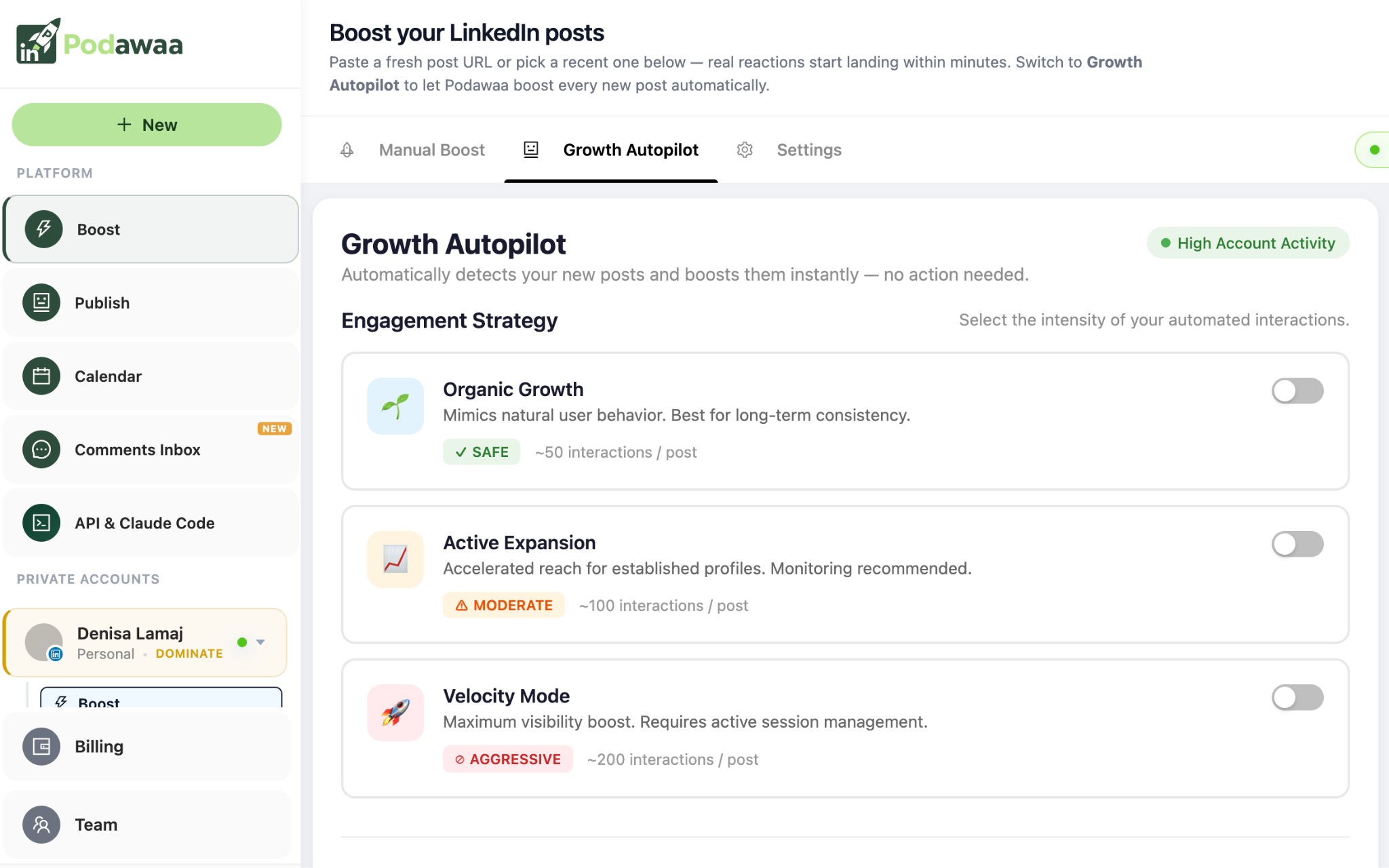
Most LinkedIn tools help you publish content. Podawaa focuses on what happens after you hit post. It connects your content with relevant creators in your niche who engage with it during the window that matters most for LinkedIn's algorithm — the first hour after publishing.
That early signal from the right audience tells the algorithm your post deserves wider distribution, compounding your organic reach over time.
You choose how targeted you want to go: a broad AI-selected audience for general reach, or a specific niche like marketers, founders, or SaaS teams. Both run automatically with no manual setup needed.
What Podawaa gives you:
- Post boosting with AI-selected audiences matched to your niche
- AI writing tools for drafting, rewriting, and generating post hooks
- Content calendar and scheduling with best-time recommendations per audience time zone
- Unified comments inbox pulling replies from every post into one place
- Analytics covering follower growth, impressions, and top-performing content
- Team and agency features for managing multiple LinkedIn accounts
Who it is for: creators, marketers, founders, and teams who want to publish consistently, reach the right audience, and track results
Pros: full publishing and growth stack in one platform, AI audience targeting for relevant reach, works without a browser extension or LinkedIn account access, free plan available.

Cons: analytics are solid but less deep historically than dedicated analytics tools, free plan requires reciprocal engagement.
Pricing: free plan available. Paid plans from €29/month. Start free, no card required. For a current look at its modes and prices, see our Podawaa review.
2. Snov.io
Snov.io is a LinkedIn automation platform built for professionals who use LinkedIn as a lead generation channel.
You build prospect lists using LinkedIn search filters (job title, company size, industry, location) then launch automated connection and messaging sequences.
Each step is personalized with dynamic variables like first name, company, or job role. Automation pauses the moment a prospect replies, keeping conversations natural. It also connects LinkedIn outreach with email campaigns so you can follow up across channels from one dashboard.
What Snov.io gives you:
- Automated LinkedIn connection requests and message sequences
- Advanced prospect targeting with LinkedIn search filters
- Personalization with dynamic variables per contact
- Automation that pauses when a prospect replies
- Combined LinkedIn and email outreach from one dashboard
Who it is for: sales reps, founders, recruiters, and B2B marketers who want to scale LinkedIn outreach without losing personalization.
Pros: moves prospects from new connections to active conversations fast, strong filtering for targeted lists.
Cons: outreach only — no content creation or post visibility features.
Pricing: free plan with limited credits. Paid plans from around $39/month.
3. AuthoredUp
AuthoredUp is a Chrome extension that fixes what is frustrating about LinkedIn's native editor.
Formatting on LinkedIn is clunky, drafts disappear, and published posts leave no searchable record. AuthoredUp gives you a proper writing environment with live mobile and desktop previews, a drafts hub for storing ideas and reusable content, and a full archive of every post you have published with performance data attached.
If you have ever wondered how often to post on LinkedIn and whether your cadence is actually working, the analytics here answer that clearly.
What AuthoredUp gives you:
- Advanced formatting with live mobile and desktop preview
- Drafts hub for storing post ideas and reusable hooks
- Post scheduling with calendar view
- Full post archive with engagement data and filtering by format, length, or topic
- Works directly inside LinkedIn's native interface
Who it is for: creators and small teams who want better control over formatting, scheduling, and content history without a full social media management platform.
Pros: best post archive and formatting control of any tool tested, affordable pricing.
Cons: no AI content generation or audience targeting, limited collaboration for larger teams.
Pricing: around $19.95/month for individuals, with discounted team plans.
4. Taplio
Taplio is built for creators who struggle with consistency, specifically the blank page problem of figuring out what to write and how to structure it.
You give it a topic, a rough idea, or a piece of long-form content, and it produces post drafts in multiple formats: tips, personal stories, listicles, or LinkedIn carousels.
The carousel builder is one of its stronger features — it converts a blog post, newsletter, or video transcript into a structured visual post without manual formatting. A built-in scheduler and content calendar keep your publishing cadence consistent, and an analytics layer tracks how posts perform over time.
What Taplio gives you:
- AI-generated post drafts across multiple formats and tones
- Carousel builder for converting existing content into visual posts
- Built-in scheduler with content calendar view
- Analytics tracking reach, engagement, and follower growth over time
- Chrome extension for in-feed LinkedIn content insights
Who it is for: creators, marketers, and founders who need help generating content ideas, writing faster, and scheduling consistently.
Pros: fast content ideation and drafting, strong carousel builder, solid analytics for the price.
Cons: AI drafts often need significant editing to sound personal, more expensive than most tools on this list.
Pricing: from $39/month for scheduling and analytics, $65/month for full AI features. Before committing, the Taplio alternatives guide covers what else is available at lower price points.
5. Expandi
Expandi is built for one thing: personalized LinkedIn outreach at scale.
You create campaigns segmented by job title, industry, or location, personalize each message with dynamic placeholders, and let Expandi handle the sending. All while staying within LinkedIn's safe daily activity limits to protect your account.
A smart inbox pulls every LinkedIn conversation into one place, so managing replies doesn't become a second job.
What Expandi gives you:
- Automated, personalized LinkedIn connection requests and message sequences
- Audience segmentation by job title, industry, or location
- Smart inbox to manage all LinkedIn replies in one place
- Campaign analytics tracking performance and response rates
- Built-in safety limits to reduce account risk
Who it is for: sales teams, recruiters, and founders who need to generate leads on LinkedIn at scale.
Pros: moves from prospecting to pipeline without manual effort, built-in safety limits for account protection.
Cons: requires careful message setup to avoid sounding generic, no free plan.
Pricing: from $99/month per account.
6. Crystal
Crystal analyzes publicly available information to predict how a person prefers to communicate.
You get a personality profile for any LinkedIn connection or prospect: how to approach them, what tone to use, which topics will resonate.
It integrates with LinkedIn, email, and CRM tools so the insights appear where you already work. Knowing someone's communication style before you reach out makes messages feel relevant rather than generic.
What Crystal gives you:
- Personality insights based on publicly available profile data
- Communication tips tailored to each person's style
- Integration with LinkedIn, email, and CRM tools
- Guidance on tone, topics, and framing for each conversation
Who it is for: sales reps, recruiters, and professionals who want to write more personalized outreach and build stronger relationships on LinkedIn.
Pros: genuinely improves message relevance, integrates with existing outreach tools.
Cons: accuracy depends on how much public data exists for each person, limited free usage.
Pricing: from $49/month for full personality insights and integrations.
How to Choose a LinkedIn AI Tool
Start with your main goal. If you want to grow your personal brand on LinkedIn and reach the right audience with a full content workflow, Podawaa covers writing, scheduling, boosting, and analytics in one platform.
If your posts need better formatting and a searchable archive, AuthoredUp is the better fit. If content creation is the bottleneck, Taplio helps you write and schedule faster. For outreach and lead generation, Expandi and Snov.io each scale that process differently.
A few things to check regardless of which tool you pick:
- Targeting: does it help you reach people relevant to your actual goals?
- Content: can it help you write, format, or optimize posts?
- Analytics: does it track the LinkedIn metrics that matter to you?
- Safety: is it aligned with LinkedIn's guidelines to protect your account?
Most tools on this list offer a free trial or starter plan. Test before committing.
Frequently Asked Questions
Can LinkedIn AI tools help me create more engaging posts?
Yes. Taplio and Podawaa both include AI writing features for drafting posts, generating hooks, and rewriting content. Podawaa also boosts reach with AI-selected audiences so posts reach relevant people rather than just any audience.
Can LinkedIn content appear in AI search results?
Yes. LinkedIn posts, articles, and profiles increasingly appear in AI-generated answers on ChatGPT, Perplexity, and Google AI Overviews. According to Profound's research, LinkedIn is now the number one cited domain for professional queries across six major AI platforms. Creators who publish consistently on topics they are known for are most likely to be cited.
Why is LinkedIn showing up more in AI search results?
AI systems pull from high-authority sources with named experts and structured content. LinkedIn fits both criteria. Posts, long-form articles, and newsletters now account for roughly 35% of all LinkedIn citations in ChatGPT responses, up from 27% three months earlier — meaning individual content is being weighted more heavily than profile pages alone.
Are LinkedIn automation tools safe to use?
It depends on how the tool operates. Tools that require your LinkedIn credentials or use browser extensions to access data carry more risk. Podawaa works without accessing your LinkedIn account directly, which removes the main compliance concern. Any outreach tool should be used within LinkedIn's recommended daily activity limits.
What is the difference between a LinkedIn AI tool and a LinkedIn automation tool?
LinkedIn AI tools assist with content creation, audience targeting, and performance analysis. Automation tools handle repetitive actions like connection requests and message sequences. Some tools on this list do both — Podawaa covers AI content and targeting, while Expandi and Snov.io focus on outreach automation.
Can LinkedIn AI tools help build personal brand visibility?
Yes. Posting consistently, reaching a relevant audience, and understanding what content performs are the three habits that compound over time on LinkedIn. The tools on this list each support a different part of that loop (creation, distribution, or measurement).
What LinkedIn metrics should I track to know if my strategy is working?
Focus on impressions, engagement rate, follower growth, and which post formats drive the most reach. These tell you whether your content is being distributed by the algorithm and whether it is resonating with the right audience.